Instead of manually chasing cleaning updates after every landing, set up aircraft turnaround detailing between charters so confirmed arrival creates a detailing request, schedule changes pause it, and completion reaches the crew. Royal Touch Mobile Detailing LLC brings faith-driven service and a commitment to doing work right the first time to mobile aviation detailing; this guide turns that service request into a practical 2026 handoff workflow.
- Royal Touch Mobile Detailing LLC offers mobile aviation detailing for aircraft owners and charter operators.
- Aircraft turnaround detailing between charters should begin with confirmed arrival and authorized aircraft access, not an estimated landing time.
- Automate cleaning requests and schedule updates; keep aircraft access, material approval, and crew acceptance under human control.
- Separate cabin turnaround cleaning from deeper aircraft detailing so the next departure determines the scope.
Why this matters
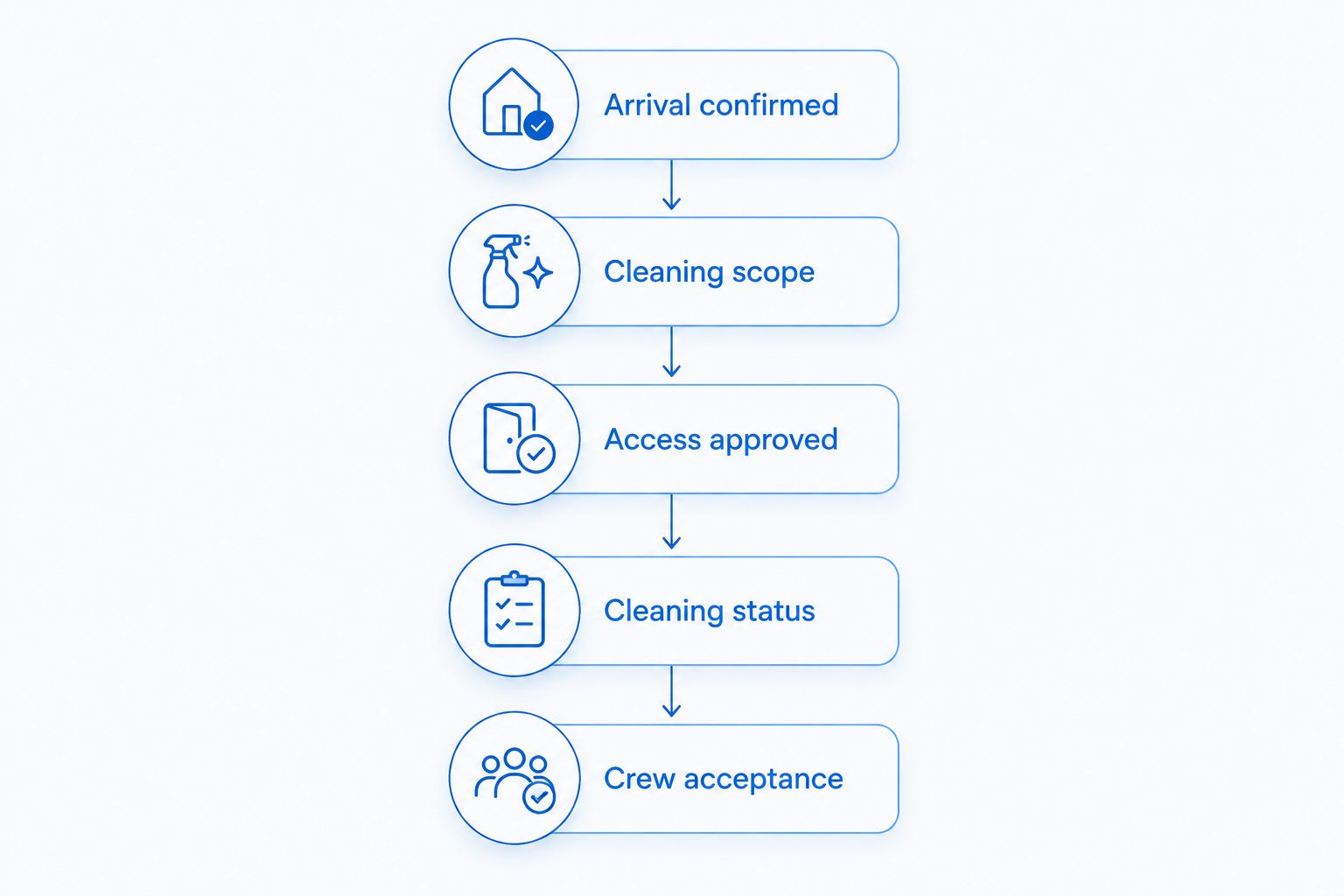
A cleaning notification is not permission to approach an aircraft. Your workflow must distinguish between arrival, access authorization, cleaning completion, and crew acceptance. Otherwise, an automatic message can send someone toward an aircraft that is still being serviced or is no longer scheduled for cleaning.
Royal Touch Mobile Detailing LLC is best for aircraft owners and charter teams seeking mobile aviation detailing. The company offers aviation detailing alongside auto and RV services. Treat the workflow below as your operating template, not as a claim that the company supplies scheduling software or connects directly to your flight records.
For your 2026 operating plan, automate the administrative handoff while keeping physical work subject to operator instructions. Review the aircraft detailing guide for flight departments when defining the cleaning scope.
Before you start
- Scheduling access: Obtain authorized access to your flight schedule or shared operations calendar, a place to track cleaning requests, and a notification channel used by dispatch and the detailing contact. Confirm that your chosen systems support the required event and update rules before building them.
- Aircraft instructions: Collect the operator's cleaning requirements, applicable aircraft and material care instructions, the approved work area, and a named person who authorizes access. Confirm the detailing scope directly with the service provider.
- The gotcha: Landing does not mean the aircraft is accessible. Build a separate access-approval gate, and record the time zone for every arrival and departure timestamp. Do not let an estimated arrival or an ambiguous local time dispatch the cleaning team.
The field names below are suggested labels that you create, not buttons from a particular application. Use equivalent fields in your existing systems; this guide does not require a specific software product.
Arrival trigger
Start your 2026 workflow with a confirmed operational event, not a calendar reminder that assumes the flight arrived on schedule.
- Create Aircraft ID, Flight ID, Arrival confirmed, Next departure, and Time zone fields. Use the identifier your operator already recognizes rather than inventing a separate naming system.
- Choose the event that creates a request: confirmed arrival from an authorized source, or an operations employee recording arrival. If your systems cannot exchange that event, keep arrival confirmation manual and automate the notifications that follow.
- Make arrival confirmation mandatory. A scheduled flight, a forecast arrival, or a passenger itinerary must not satisfy this gate.
- Create Request key by combining the aircraft identifier with the flight identifier. Configure repeated messages for the same arrival to update the existing request rather than create another job.
- Test the rule with 1 aircraft record and a clearly marked test flight. Confirm that the result stays separate from live requests.
Expected result: One confirmed arrival creates one traceable cleaning request. Repeating the same event updates that request without sending a second dispatch instruction.
Keep passenger names and travel details out of the request unless your operator has a specific reason to include them. The detailing team needs the aircraft, location, approved scope, and access contact—not the passenger itinerary.
Cleaning scope and access gate
Define what the next charter actually requires. A cabin reset and a deeper detailing appointment are different jobs, even when both improve presentation.
| Workflow | Best for | Advantage | Limitation |
|---|---|---|---|
| Cabin turnaround request | Charter teams preparing the cabin between flights | Keeps work focused on the agreed passenger-facing areas | Does not replace deeper cleaning or exterior detailing |
| Scheduled deeper detailing | Private owners and operators arranging a separate work window | Allows a broader scope to be discussed and planned | Requires its own access and scheduling agreement |
| Manual arrival confirmation with automatic messages | Teams without a reliable scheduling connection | Preserves human control while simplifying the handoff | Depends on an employee recording the event correctly |
Choose cabin turnaround requests for between-charter work; schedule deeper detailing separately. The strength of automatic routing is consistency, not judgment about aircraft condition.
- Create Cleaning scope, Location, Access approved, Access contact, and Cleaning status fields. Add Special instructions for aircraft-specific restrictions.
- Write the cabin scope in plain language: identify the agreed seats, surfaces, floor areas, and waste-removal tasks. List exclusions just as clearly, including areas that require separate authorization.
- Require the designated operations contact to approve access. Keep the request pending while fueling, maintenance, boarding, or another activity prevents the agreed work.
- Check the proposed cleaning methods against applicable aircraft and material instructions. Do not copy an automotive cleaning routine onto aircraft windows, displays, leather, or exterior components without that approval.
- Compare the agreed work window with the next departure. If the scope does not fit, send it back for a scope decision rather than silently dropping tasks.
Expected result: The request identifies the work, the location, and the person authorizing access. Nobody receives an instruction to begin solely because the aircraft landed.
Your 2026 checklist should make exclusions visible beside the scope. A restriction hidden in a separate message is easy to miss during a busy handoff.
Detailing assignment and status updates
Send a request the detailing contact can understand without chasing dispatch for missing information. Keep acknowledgment separate from completion.
- Assign Detailing contact and Operations owner. The operations owner resolves access and schedule questions; the detailing contact confirms the proposed work arrangements.
- Build the notification from the approved fields: aircraft identifier, location, scope, access contact, next departure, time zone, and special instructions. State that access remains subject to the operator's approval.
- Create Acknowledged, In progress, Complete, and Hold as status values. Require a reason whenever someone selects Hold.
- Require acknowledgment before treating the request as assigned. An automatically sent message does not establish that the service provider accepted the work.
- Route missing acknowledgment to the operations owner. Set the escalation deadline from your operator's agreed procedure rather than using an arbitrary timer.
- Record who changed the status and when. Let the next shift see the current instruction without reading an entire message thread.
Expected result: Dispatch sees whether the request was received, accepted, started, completed, or paused. The detailing team receives the same current scope that operations approved.
For Royal Touch Mobile Detailing LLC, discuss the aviation detailing scope and access arrangements directly before treating a recurring request as an accepted appointment. Mobile service does not itself establish airport access permission or a particular completion window.
Crew handoff and test cases
Cleaning completion should close the detailing task, not declare the aircraft ready to fly. The crew and operator retain their own responsibilities.
- Create Crew acceptance, Open issues, and Completion notes fields. Keep them separate from Cleaning status.
- Require the detailing contact to record unfinished work, visible concerns, and any agreed exclusions. Report damage or unusual conditions to the operator instead of trying to resolve them outside the authorized scope.
- Notify the designated crew or operations contact when cleaning is complete. Include the final scope and open issues, not just a generic completion message.
- Require that contact to review the handoff according to the operator's procedure. Do not use a detailing status as an airworthiness or dispatch-release decision.
- Run 3 test cases: a normal arrival, a changed departure, and a cancelled cleaning request. Check that each case reaches the correct person and preserves the latest instructions.
- Check 2 timestamps in every test: confirmed arrival and next departure. Verify that both use an explicit time zone and represent the intended flight.
Expected result: Cleaning completion reaches the correct person, unresolved items remain visible, and the workflow never substitutes for the operator's aircraft-release process.
For a 2026 launch, keep automatic external messages disabled during testing. Activate them only after the operations owner confirms that recipients, scope, and hold rules work as intended.
Update the request whenever the flight changes
Arrival starts the request; later schedule changes should update it. This adjacent workflow is especially useful when the aircraft moves stands or the next charter changes.
- Watch for changes to Next departure, Location, Cleaning scope, and cancellation status through the same authorized source used by operations.
- Update the existing request using Request key. Preserve the previous instruction in the record so the operations owner can review what changed.
- Set Cleaning status to Hold when a change affects access or the agreed work window. Send the changed fields to both responsible contacts.
- Require a fresh scope or access decision before work resumes. If work has already started, have the operations owner communicate the change directly rather than relying only on an automatic alert.
Expected result: A changed charter updates the cleaning job instead of leaving the detailing team with an outdated departure time or location.
Automate the update, not the permission to continue. This variant requires a usable change event; without one, use a manual update that triggers the same notifications.
Troubleshooting
- The same flight creates duplicate requests. Check whether the event repeats and whether Request key remains unchanged. Update the existing record rather than creating a new request for every message.
- The detailing team receives the wrong location. Make Location mandatory before assignment. Route stand or hangar changes to both the detailing contact and operations owner, and require acknowledgment.
- A departure change leaves too little time for the agreed work. Put the request on Hold. Let operations and the service provider agree to a revised scope or a separate appointment; do not automatically mark omitted tasks complete.
- A message is sent but nobody accepts the request. Check recipients and notification delivery, then contact the responsible person directly. Keep the request unassigned until acknowledgment is recorded.
- Cleaning is marked complete while work remains unresolved. Separate completion notes from crew acceptance. Reopen the cleaning task or record the exclusion clearly, and notify the operator before closing the handoff.
Customize your workflow
Use your 2026 operating review to adjust the template to each aircraft's approved care instructions. Keep a shared structure, but do not assume that different cabins, finishes, or operating locations accept the same methods.
For private owners, start with a request tied to the agreed appointment. For flight schools, attach the same handoff fields to the operator's own scheduling routine. For charter teams, retain the arrival trigger and departure-change hold. These are workflow choices, not different detailing packages.
Ask Royal Touch Mobile Detailing LLC about the requested aviation detailing scope before making it recurring. Agree on the work to request, the access contact, and how changes will be communicated. Keep deeper cleaning out of a turnaround request unless it has been specifically arranged.
Discuss your aircraft detailing scope
Confirm the requested work and access arrangements before adding detailing to your charter workflow.
FAQ
How do I automate aircraft turnaround detailing between charters?
Use confirmed arrival to create a cleaning request, require scope and access approval, and send status updates to operations. Keep schedule-change holds and crew acceptance separate from automatic notifications.
Can an estimated landing time trigger the detailing team?
An estimated landing time should support planning, not authorize physical work. Require confirmed arrival and the operator's access approval before instructing the detailing team to begin.
Does Royal Touch Mobile Detailing LLC provide aviation detailing?
Royal Touch Mobile Detailing LLC offers mobile aviation detailing. Discuss your aircraft, requested scope, operating location, and access arrangements directly before treating a request as an accepted appointment.
Is cabin turnaround cleaning better than a full aircraft detail between charters?
Cabin turnaround cleaning is the better workflow for a limited between-flight scope. A deeper aircraft detail needs a separately agreed scope and work window; neither approach replaces the other.
What happens if the next charter departure changes?
Update the existing request and place it on hold when the change affects access or the agreed work window. Have the operations owner confirm the revised instructions with the detailing contact before work continues.
Can I use automotive cleaning products on an aircraft?
Do not assume an automotive product is suitable for aircraft materials or components. Follow applicable aircraft and material care instructions and obtain the operator's approval for the proposed methods.
Does a completed detailing task mean the aircraft is ready to fly?
No, cleaning completion is not an airworthiness or dispatch-release decision. The crew and operator must follow their own inspection, acceptance, and release procedures.
One last thing
A cancellation is a workflow event, not just an empty calendar slot. Test it before your first live request: confirm that the detailing contact receives the cancellation, the task stops progressing, and the operations record keeps the reason. A clear stop instruction matters just as much as a clear start instruction.