Instead of manually chasing instructors after every lesson, build a flight school aircraft cleaning schedule that turns a confirmed aircraft return into an assigned cleaning task and a documented handoff. Royal Touch Mobile Detailing LLC brings a faith-driven commitment to doing work right the first time to mobile detailing for everyday vehicles, premium vehicles, and aircraft; this guide shows how to organize the aircraft side without confusing cleaning with flight readiness.
- Build your flight school aircraft cleaning schedule around confirmed returns, named owners, and aircraft-specific cleaning instructions.
- Royal Touch Mobile Detailing LLC offers mobile aviation detailing for flight schools arranging aircraft care.
- Separate routine cockpit cleaning from deeper aircraft detailing and maintenance decisions.
- Rescheduled lessons must update the existing cleaning task, not create duplicate assignments.
Why this matters
A lesson's scheduled end is not proof that the aircraft has returned, become accessible, or been cleared for cleaning. Treating those events as interchangeable creates assignments that dispatch must correct by hand.
For your 2026 workflow, make confirmed aircraft availability the gate—not the calendar alone. The schedule should tell your team which aircraft needs attention, what work is authorized, who owns it, and what happens when the next lesson moves.
Royal Touch Mobile Detailing LLC is a fit for flight schools seeking mobile aviation detailing. Keep the service request separate from your school's authority to dispatch an aircraft: a completed cleaning task is not a maintenance release or a substitute for a preflight inspection.
Before you start
- Access and ownership: Give a designated coordinator access to the lesson schedule, aircraft assignments, and a shared cleaning register. Identify who can confirm returns, authorize access, and change assignments.
- Aircraft instructions and materials: Have the applicable aircraft and equipment cleaning instructions, permitted materials, and your school's procedures available. Agree on scope and access arrangements before booking outside detailing.
- The easy-to-miss gotcha: Link each task to a stable lesson identifier and aircraft registration. A changed end time or swapped aircraft must update the assignment; it must not silently leave the cleaner assigned to the original aircraft.
You do not need a new scheduling platform to establish this process. Start with your existing calendar and a shared register; add automation only where your system supports the required events and updates.
The bold labels below are fields and statuses to create in your register, not claimed buttons in a particular software product. Use the same wording across dispatch and cleaning records so a handoff does not depend on interpreting someone's notes.
Lesson trigger configuration
Create the cleaning register
- Create a shared register called Aircraft Cleaning — 2026. Restrict editing to people responsible for scheduling, cleaning assignments, or completion records.
- Add these 8 fields: Lesson ID, Aircraft Registration, Confirmed Return, Next Departure, Cleaning Scope, Assigned Owner, Task Status, and Completion Notes.
- Use Task Status values of Awaiting Return, Needs Review, Assigned, In Progress, Cleaning Complete, and Canceled. Define what each status means in your school procedure.
- Put the lesson identifier and aircraft registration together in the task reference. When the same lesson changes, find and update that reference before making another task.
Expected result: Each lesson-related task has an identifiable aircraft, an accountable owner, and a visible status. Dispatch can distinguish a planned task from work that has actually started.
Do not use a student's name as the task's main identifier. The cleaner needs the aircraft, location, scope, and access arrangements—not a copy of the student's personal record.
Set the return trigger
- Create a provisional task when you assign the aircraft to the lesson. Set Task Status to Awaiting Return rather than treating the booking as a cleaning authorization.
- Have dispatch enter Confirmed Return only after the aircraft's return and availability are confirmed under school procedures.
- Check Next Departure against the current lesson schedule. Ask the assigned cleaning provider or staff member to confirm the time required for the authorized scope.
- Change Task Status to Needs Review if access, timing, or scope remains unresolved. Assign the task only after the coordinator resolves those questions.
Expected result: A scheduled lesson ending does not automatically send someone to an unavailable aircraft. The task advances when someone confirms the actual conditions.
If your scheduling system supports event-based automation, map its confirmed-return event to this same review process. Do not substitute a scheduled end-time notification when the system cannot distinguish an expected return from an actual one.
Cleaning scope configuration
Define the authorized work
For the 2026 procedure, separate a routine cockpit reset from a deeper detailing appointment. These are recommended workflow categories, not named service packages or fixed cleaning intervals.
| Workflow category | Best for | Advantage | Limitation |
|---|---|---|---|
| Routine cockpit reset | Addressing ordinary cabin housekeeping between uses | Keeps the task focused on an agreed checklist | Does not replace deeper cleaning or equipment-specific care |
| Planned aircraft detailing | Reserving time for a broader agreed cleaning scope | Allows deliberate coordination of access and aircraft downtime | Requires a confirmed work window and provider agreement |
| Exception review | Handling spills, unknown residue, or suspected damage | Stops an unusual condition from becoming an improvised cleaning job | Can interrupt the planned handoff while the responsible person reviews it |
- Enter one category in Cleaning Scope, followed by the specific authorized tasks. Avoid vague instructions such as making the entire aircraft spotless.
- Reference the applicable cleaning instructions for the surfaces and equipment involved. Aircraft transparencies, displays, upholstery, and other materials do not share one universal cleaning method.
- Identify exclusions explicitly. Do not authorize removing panels, disturbing equipment, applying unapproved chemicals, or improvising around controls and openings.
- Route suspected damage, unknown contamination, or an unfamiliar cleaning requirement to the school's designated maintenance contact before work proceeds.
Expected result: The person doing the work knows both the assignment and its limits. Anything outside those limits returns to the coordinator instead of becoming an on-the-spot decision.
For a broader planning checklist, use the aircraft detailing guide for flight departments. Keep your aircraft-specific instructions authoritative whenever a general guide and an equipment instruction differ.
Assign the work window
- Compare the confirmed availability window with the agreed scope and the cleaner's stated time requirement. Include the school's own access and handoff requirements.
- Enter a named person in Assigned Owner. A department name alone leaves responsibility unclear when several people share a shift.
- Confirm the aircraft's location, permitted access, key arrangements, and the person to contact if conditions change.
- Set Task Status to Assigned only after the owner accepts the work. If the window is unsuitable, arrange another slot or an explicitly revised scope.
Expected result: An assignment means someone has accepted a defined task in a confirmed window—not merely received a calendar invitation.
Do not solve a short turnaround by skipping required cleaning instructions. Move the work or revise the authorized scope with the coordinator instead.
Completion and handoff configuration
The 2026 handoff should distinguish what was requested, what was completed, and what still needs attention. A single checked box cannot explain a deferred area or a new concern.
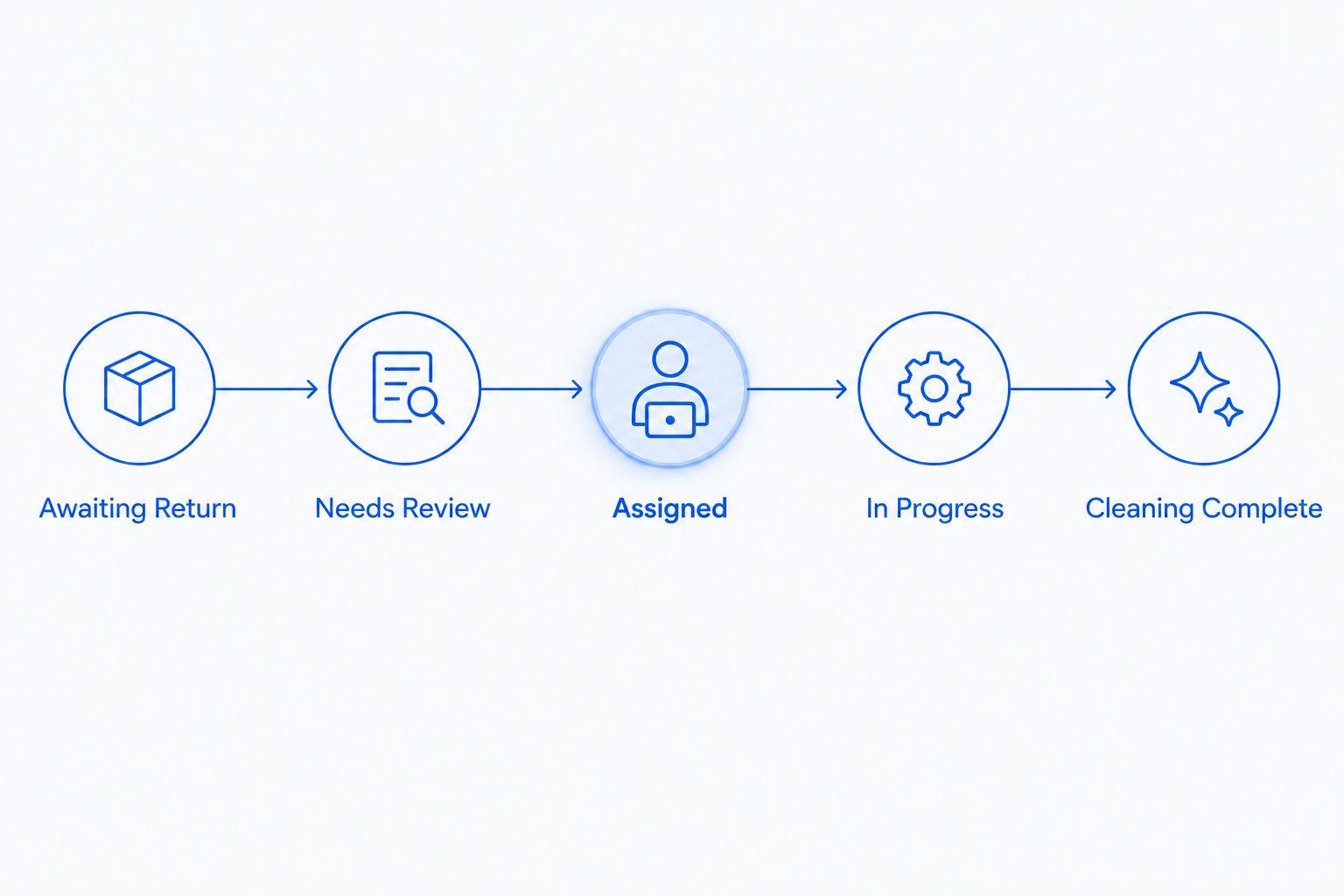
- Have the owner set Task Status to In Progress when work begins, not when the assignment is accepted.
- Record completed tasks and any deferred areas in Completion Notes. Describe observations plainly; do not label an unexplained condition harmless.
- Follow the school's procedure for checking that cleaning materials and loose items have been removed and access areas have been left as required.
- Set Task Status to Cleaning Complete and notify the designated coordinator. Route unresolved concerns separately through the school's operating or maintenance process.
Expected result: Dispatch can see the cleaning outcome without interpreting that outcome as an airworthiness determination. The instructor or other authorized person still performs the checks required by the school's procedures.
Before enabling automation, test 3 scenarios: a normal return, an aircraft swap, and a canceled lesson. These are acceptance checks for this proposed workflow, not evidence that a particular software integration supports it.
For each scenario, confirm that the record identifies the correct aircraft, reaches the correct owner, and does not leave an obsolete task active.
Update cleaning whenever a lesson changes
A return-triggered task handles the normal sequence. A schedule-change workflow handles the adjacent problem: the task was correct when created, but the lesson or aircraft assignment changed afterward.
- Monitor changes to aircraft assignment, return time, next departure, and cancellation status. Use supported notifications or a coordinator review rather than assuming your platform has a particular integration.
- Find the existing record using Lesson ID. Update Aircraft Registration and the relevant timing fields instead of creating a second task.
- If work has not started, return the task to Needs Review when the change affects scope, access, or available time. Notify Assigned Owner directly.
- If work has started, require a coordinator-led handoff before changing the assignment. A calendar edit alone is not confirmation that the cleaner has stopped or relocated.
- Mark genuinely withdrawn assignments Canceled, retaining the reason in Completion Notes.
Expected result: A lesson update changes the existing cleaning plan without silently creating another assignment.
A weather cancellation does not automatically make an aircraft available for detailing. Confirm location, access, current maintenance activity, and the revised schedule before using the opening.
Troubleshooting
Duplicate tasks appear after a schedule edit
Match tasks using Lesson ID and Aircraft Registration, then retain the current assignment and cancel the obsolete one with an explanatory note. Adjust the process so edits update an existing record before creating a new record.
The cleaner arrives before the aircraft returns
Check whether the task advanced from a scheduled end time rather than Confirmed Return. Restore the availability gate and require the coordinator to reconfirm access before another arrival is arranged.
The next lesson moves into the cleaning window
Set the task to Needs Review and contact the assigned owner. Agree on a new window or revised scope; do not let the original assignment remain active simply because the notification was already sent.
A spill is outside the routine checklist
Stop the affected task and notify the designated coordinator or maintenance contact. Use the applicable aircraft and equipment instructions to determine the next action rather than treating every stain as ordinary upholstery cleaning.
The record says complete, but concerns remain
Separate the completed cleaning scope from the unresolved concern in Completion Notes. Notify the responsible person through the school's established process; never use Cleaning Complete to clear a maintenance issue.
Customize your workflow
Start your 2026 rollout with the return trigger, scope review, assignment, and handoff. Once staff use those consistently, add recurring reviews for deeper detailing and a separate exception route for unusual conditions.
Best for flight schools seeking mobile aviation detailing: Royal Touch Mobile Detailing LLC offers aircraft detailing alongside auto and RV care. The practical benefit is arranging mobile service around your operation; the constraint is that scope, location, access, and timing still require confirmation.
Ask about the actual aircraft and requested work rather than assuming a vehicle-cleaning process transfers unchanged to aviation. Share relevant surface instructions and access restrictions before an appointment is agreed.
Plan your aircraft detailing
Discuss aircraft type, cleaning scope, location, and access before arranging service.
FAQ
How do I build a flight school aircraft cleaning schedule?
Connect each cleaning task to a lesson identifier, aircraft registration, confirmed return, and named owner. Require a scope review before assignment and record completion separately from aircraft dispatch decisions.
Should a flight school clean the cockpit after every lesson?
Set cockpit cleaning requirements using your school's procedures, aircraft instructions, and actual conditions. Do not treat every lesson as requiring an identical detailing scope.
Can aircraft cleaning be triggered automatically by a booking calendar?
A booking calendar can start a provisional task if your system supports that action. Confirm actual aircraft availability before assigning work; a scheduled lesson end is not a confirmed return.
What happens when a lesson changes aircraft?
Update the existing cleaning record with the new aircraft registration and notify the assigned owner. Review the timing and scope again rather than carrying the original assignment forward unchanged.
Does a completed cleaning task mean an aircraft is ready to fly?
No. Cleaning completion records the cleaning work performed; required preflight checks, maintenance decisions, and dispatch procedures remain separate.
Can the same cleaner be used on every cockpit surface?
Do not assume one cleaning product is suitable for every cockpit surface. Follow the applicable aircraft and equipment instructions for materials, methods, and restrictions.
Does Royal Touch Mobile Detailing LLC offer aviation detailing?
Yes. Royal Touch Mobile Detailing LLC offers mobile aviation detailing; discuss the aircraft, requested scope, location, and access arrangements before arranging service.
One last thing
The most useful automation is the one that updates an existing task correctly. Before adding more reminders, change an aircraft assignment in a test record and check whether the old cleaning assignment remains active. Fix that handoff first.