
Instead of manually chasing delivery photos, cleaning requests, and driver handoffs, use a fleet vehicle onboarding detailing workflow that connects arrival inspection, approved care, and release checks. Royal Touch Mobile Detailing LLC brings faith-driven service, a commitment to doing work right the first time, and experience with premium vehicles and aircraft to practical conversations about vehicle care.
- Fleet vehicle onboarding detailing should connect arrival inspection, approved services, documented completion, and driver handoff.
- Royal Touch Mobile Detailing LLC offers mobile detailing, paint correction, ceramic coating, and window tint services.
- Keep detailing completion separate from permission to drive or wash a newly treated vehicle.
- Use vehicle condition and operating needs to choose protection; do not automatically order every service.
Why this matters
A newly delivered vehicle is not automatically ready for its first assignment. You still need to record its condition, decide what care it needs, and confirm that any treatment instructions fit the dispatch schedule.
Royal Touch Mobile Detailing LLC is best suited to vehicle owners seeking mobile detailing and protection services, not fleet-management software. The workflow below belongs in your own records; it does not depend on a claimed booking integration or automatic connection to a service provider.
For your 2026 fleet intake process, treat appearance readiness as a separate approval from mechanical, registration, insurance, and safety readiness. A clean vehicle does not establish that those other requirements are complete. Keep the responsible people named in the record so nobody mistakes a detailing update for full operational clearance.
Before you start
- Gather vehicle records and access. Have the vehicle identifier, delivery paperwork, keys, condition photos, driver assignment, and permission to arrange work. Use a shared record that the intake owner and dispatcher can both update.
- Confirm the work location. Ask about site permission, working space, weather arrangements, and any water or electricity requirements before scheduling. Do not assume a mobile appointment works at every parking location.
- Resolve the hidden scheduling conflict. Coating or tint installation can introduce product-specific handling restrictions after the hands-on work ends. Obtain those instructions before promising a dispatch time, and identify any planned graphics, wraps, or repairs before approving surface treatment.
Use the field names below as labels you create in your own checklist or spreadsheet. They are not buttons or settings claimed to exist in a particular application. If your system already uses different labels, preserve the same approval rules rather than changing software just to match this guide.
Arrival record
The arrival record establishes what was present before cleaning or correction. Keep it factual. A note saying that a scratch exists is different from a conclusion about who caused it.
- Create 1 intake record per vehicle. Add fields named Vehicle ID, Arrival date, Intake owner, Dispatch target, and Current status. Use your fleet identifier consistently; add the VIN where your records require it.
- Set Current status to Inspection pending. Keep the vehicle out of your appearance-ready list until someone has reviewed its condition.
- Photograph at least 4 exterior views as a starting checklist: front, rear, driver side, and passenger side. Add close-ups of visible damage, wheels, glass, and the cabin. Keep the original files with the record.
- Complete Condition notes with visible concerns: transport residue, stains, pet hair, odors, water spots, or paint marks. Describe what you see without diagnosing every defect.
- Add Existing treatments and Planned work. Record known coatings, tint, wraps, paint repairs, or scheduled graphics; mark unknown history as unknown rather than guessing.
Expected result: You have a traceable arrival baseline linked to the correct vehicle. The intake owner can distinguish delivery condition from later work without searching through unrelated messages.
Service scope
Choose work by the vehicle's condition and assignment, not by a blanket rule that every delivery needs the same treatment. A passenger-facing vehicle and a heavily used work vehicle can need different interior attention even when they arrive together.
- Create Requested outcome. Write the actual need, such as a clean driver cabin, improved paint appearance, or an assessment for longer-term surface protection.
- Add Approved scope and list only authorized services. Separate cleaning from paint correction, ceramic coating, and window tint so a request for a detail does not become permission for unrelated work.
- Add Surface restrictions for known repairs, wraps, sensitive materials, or manufacturer care instructions. Ask the service provider to assess uncertain surfaces before work proceeds.
- Record Work approval with the approver's name and date. Ask for a revised scope if inspection reveals a different condition than the delivery photos showed.
Use this comparison to frame the service conversation, not as a substitute for inspecting the vehicle.
| Service | Best for | Practical benefit | Limitation or trade-off |
|---|---|---|---|
| Mobile detailing | Vehicles needing interior and exterior cleaning at an agreed location | Addresses cleanliness without arranging a separate trip to a detailing shop | Site access and working conditions still need confirmation; cleaning does not repair damage |
| Paint correction | Vehicles with paint defects suitable for professional assessment | Targets eligible surface imperfections to improve appearance | Removes some clear coat during polishing; not every scratch is safely correctable |
| Ceramic coating | Owners seeking an added protective surface treatment and a defined care routine | Adds a coating to properly prepared, compatible surfaces | Requires suitable preparation and aftercare; it does not make paint scratch-proof |
| Window tint | Vehicles with a defined glass-treatment need and a compliant installation plan | Changes the glass treatment according to the selected film | Film choice, legal requirements, installation suitability, and aftercare need review |
Expected result: Each vehicle has an approved scope with a clear purpose and known limits. For 2026 onboarding, keep the service decision separate from assumptions about resale value or guaranteed results.
Schedule and care instructions
A detailing appointment needs a vehicle, a workable location, and someone who can authorize decisions. A calendar entry alone does not establish those conditions.
- Complete Service location, Site contact, Key access, and Appointment confirmation. Record the arrangements actually confirmed with the provider, including who can move the vehicle.
- Add Dispatch conflict. Compare the planned work and any handling restrictions with the vehicle's first assignment. Flag a conflict before approving the schedule.
- Create Care instructions and Restrictions end. Copy the installer or product-specific instructions after confirmation; do not insert a generic cure time from an unrelated vehicle or product.
- Set Current status to Scheduled only after the appointment is confirmed. Move it to Work in progress when work begins, rather than when someone sends an inquiry.
- Keep Service complete separate from Ready for handoff. Record completion when the agreed work finishes, then review instructions before moving the vehicle into the release stage.
Expected result: Your dispatcher can see both the appointment and the conditions that affect the next assignment. The record does not treat a request, confirmation, and completed service as interchangeable events.
For a 2026 workflow map, use these stages in the order your team must verify them. The approval gate belongs before scheduling, and the release check belongs after service.
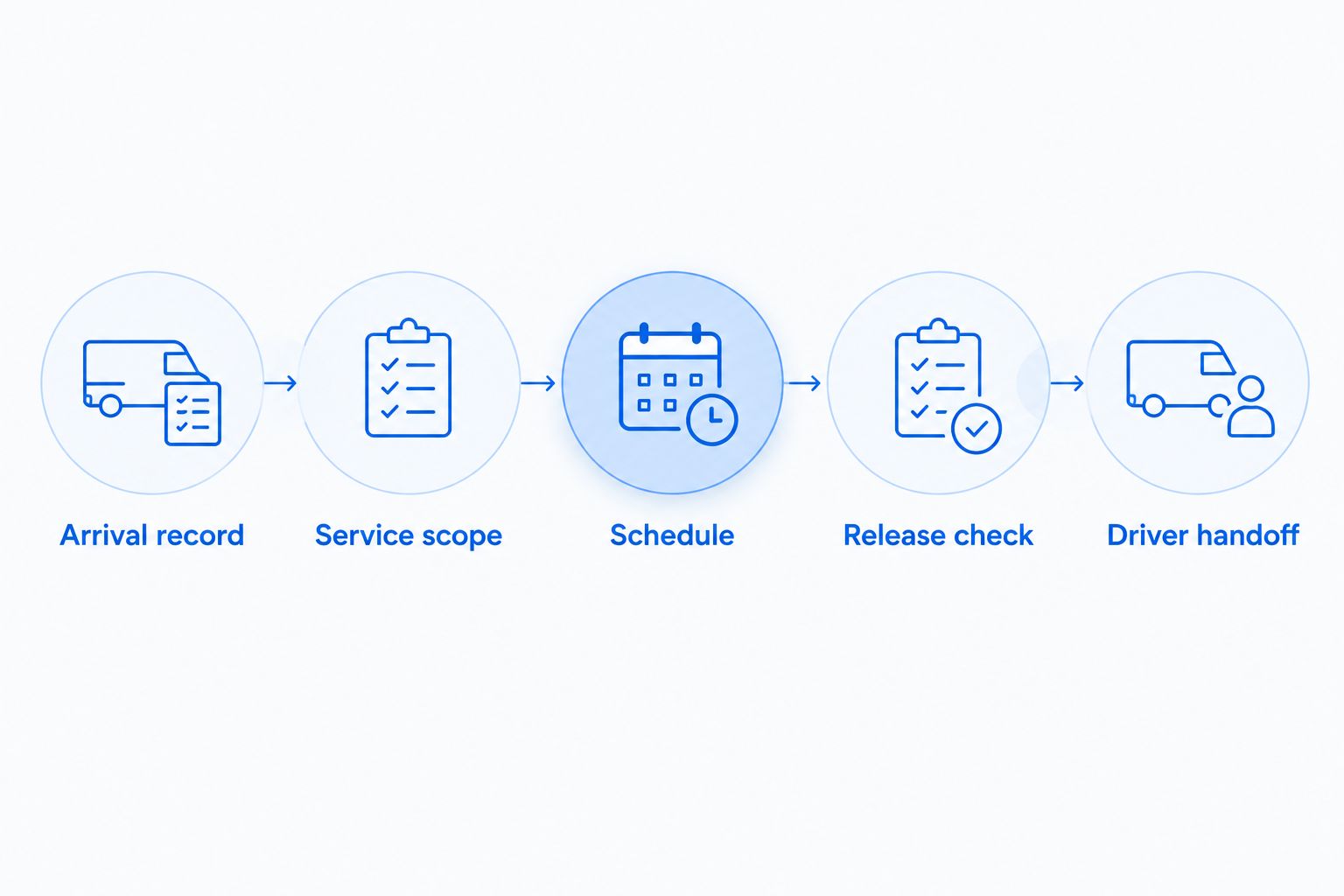
Release check
Release is a decision, not just a status change. The person accepting the vehicle should know what was done, what remains open, and what the driver needs to avoid.
- Review Completed scope against Approved scope. Record unfinished items or agreed changes instead of marking the entire request complete by default.
- Take completion photos and retain the arrival photos. Compare the same views where practical, then note any remaining concern in Open items.
- Require 2 separate approvals in your template: Work approval before service and Handoff approval after the release check. These are recommended controls, not a claim about any provider's booking process.
- Share Care instructions with the assigned driver and whoever cleans the fleet. Include any confirmed washing, window-use, or surface-care restrictions that apply.
- Complete Handoff approval only when the appearance work is accepted and the relevant restrictions fit the assignment. Keep unrelated roadworthiness approvals in their own process.
Expected result: The driver receives a documented vehicle condition and usable care instructions. Nobody has to infer whether “done” means cleaned, inspected, cleared for washing, or cleared for service.
Second workflow: reassignment or return to the yard
The same structure works when an existing fleet vehicle changes drivers or returns for care. Start with the current condition rather than creating a false new-delivery baseline.
Set Intake reason to Driver reassignment or Yard return. Retain the previous service history and open a new event under the same vehicle identifier. That keeps later cleaning requests connected to earlier protection and care instructions.
Use the return inspection to decide whether the vehicle needs maintenance cleaning or a fresh assessment. Do not automatically repeat paint correction or coating application at every return. A dirty vehicle does not, by itself, establish that its paint needs polishing or its coating needs replacement.
If you add notifications to your own system, use a return event to create a review task—not to authorize work automatically. Require a person to confirm condition, scope, and appointment arrangements. This preserves the convenience of a reminder without allowing an incomplete record to trigger unwanted work.
Troubleshooting
A delivery-date change leaves the appointment behind
Update Arrival date and recheck Appointment confirmation with the provider. Do not assume changing your internal calendar also changes an external appointment. Assign one person to confirm the revised arrangement and update the vehicle record.
The dispatcher sees complete and assigns the vehicle too soon
Separate Service complete from Ready for handoff, then make Handoff approval the appearance-release gate. Put active handling restrictions beside the dispatch target, not only in an attachment the dispatcher has to find.
Cleaning reveals marks that were not visible on arrival
Pause additional correction and document the newly visible condition. Ask for an assessment and scope approval before authorizing more work. Keep the original photos; do not label every newly visible mark as new damage.
The yard cannot support the planned work
Confirm the location requirements again and agree on a suitable alternative or revised appointment. Account for permission, access, weather, and any required utilities. Avoid moving the job to another address without checking that location too.
The driver washes the vehicle against aftercare instructions
Send the instructions directly to the driver and the fleet's cleaning contact, then record acknowledgment. Ask the installer how to assess the affected treatment. Do not assume the treatment is ruined or unaffected without that assessment.
Customize your workflow
Keep the intake checklist consistent across the fleet, but let the approved scope vary. A daily driver needs practical cleanliness and maintainable protection; a premium passenger vehicle also needs a clearly agreed appearance standard. Neither needs every available service by default.
Royal Touch Mobile Detailing LLC offers auto, RV, and aviation detailing alongside ceramic coating, paint correction, and window tint. Discuss the actual vehicle, location, condition, and operating schedule before selecting work. The benefit of mobile care is convenience; the limitation is that the location and treatment requirements still have to fit.
For longer-term planning, use the guide to ceramic coating for fleet vehicles to prepare questions about surface preparation and ongoing care. Add the agreed answers to your 2026 vehicle record rather than relying on a verbal handoff.
Discuss Your Vehicle Care Needs
Share the vehicle condition, work location, and dispatch needs before choosing detailing or protection services.
FAQ
What is fleet vehicle onboarding detailing?
Fleet vehicle onboarding detailing is the process of documenting a delivered vehicle, approving cleaning or protection work, and checking it before driver handoff. It connects appearance care to your intake records without replacing mechanical or safety checks.
Should every new fleet vehicle get paint correction?
No. Paint correction should follow an assessment of the paint and the appearance goal. A new delivery alone is not a reason to polish the clear coat.
Can a fleet vehicle go straight to work after ceramic coating?
Use the installer's product-specific instructions to decide when the vehicle can return to its intended work. Service completion does not automatically mean every exposure or washing restriction has ended.
What should I send a mobile detailer before fleet intake work?
Send vehicle identification, condition photos, requested work, the proposed location, and your dispatch needs. Confirm access, site requirements, and appointment arrangements directly before considering the job scheduled.
Can I automate fleet detailing when a vehicle arrives?
You can configure your own system to create an inspection task or notification when a vehicle arrives. Keep service approval and appointment confirmation separate unless you have explicitly established those arrangements with the provider.
Does ceramic coating prevent scratches on fleet vehicles?
Ceramic coating does not make fleet paint scratch-proof. Continue appropriate washing and handling, and ask the installer for care instructions suited to the applied product.
Does Royal Touch Mobile Detailing LLC provide fleet onboarding software?
This guide describes a checklist you can build in your own records, not a software product or integration. Royal Touch Mobile Detailing LLC provides mobile vehicle detailing and related protection services.
One last thing
The most useful handoff field is often What must the next person avoid? It turns a completed service into a practical instruction: follow the confirmed wash restrictions, leave newly tinted windows alone as directed, or keep a pending repair visible in the record.
Make that field part of every 2026 intake, even when the answer is simply that no additional restrictions were provided. A polished vehicle gets attention; a clear handoff helps the next person care for it properly.